Pixel-Perfect Documents in Seconds.
The modern document studio. Effortlessly build print-ready PDFs, social visuals, and templates directly in your browser without complex software. Stop printing paper just to sign and scan—add handwritten signatures, realistic stamps, and scanner effects, all 100% locally and privately.
Compatible with all major web browsers: Chrome, Edge, Brave...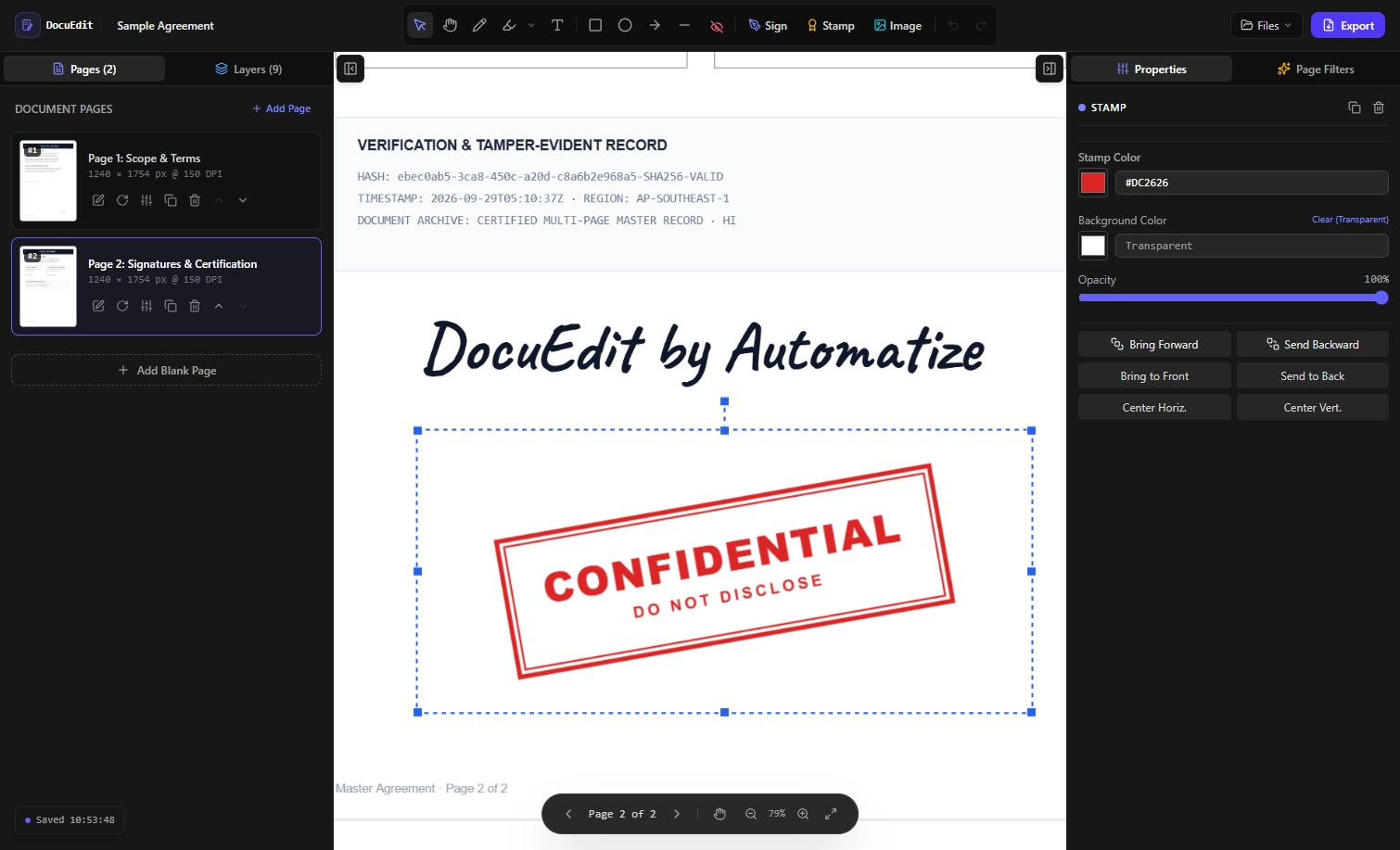
How It Works
Edit, annotate, and export your files in 3 simple steps — 100% private, processed entirely in your browser.
1. Open Your File
Import your PDF or image files directly into the web canvas.
Your documents are never uploaded to any server and stay on your device.
2. Sign, Edit & Annotate
Add your hand-written signature, custom layers, text, shapes, highlight key details, or brush & redact sensitive info.
Apply filters, adjust object positioning, and organize z-indexes with precise pixel controls.
3. Export or Print
Render your finished document instantly to high-resolution PDF or image formats, apply filters to make it look like scanned or send it directly to your printer with print-ready precision.
Features
Master your document editing workflow and design pixel-perfect layouts effortlessly!
Realistic Scan Effect
Make digital PDFs look like authentically scanned paper documents with customizable tilt, noise, contrast, grayscale, and paper texture filters—or do the reverse and clean up noisy physical scans into crisp digital files.
Signatures, Stamps & Watermarks
Add authentic handwritten signatures and realistic official stamps in seconds to sign agreements, certify docs, add your own watermarks, or mark approvals.
Layer-Based Editing
Full control over every element. Arrange, stack, position text, images, shapes, change transparency and graphics with precise z-index rendering.
Annotate & Redact & Draw
Highlight important sections, add freehand brush markings, permanently mask sensitive information before sharing or printing, or simply draw, you are the artist.
Merge PDF Documents
Combine multiple PDF files or single pages into one cohesive document easily with drag-and-drop page ordering.
Split PDF, Remove & Organize Pages
Delete unwanted pages, split multi-page documents, or rearrange pages in any custom sequence before exporting.
Rotate Pages
Fix upside-down or sideways pages instantly with 90-degree and 180-degree precision orientation controls.
Insert Photos & Graphics
Add images, profile photos, seals, logos, or icons directly onto document pages with custom opacity and resizing. Create photo album easily.
Hide & Mask Watermarks
Cover up existing document watermarks, headers, or unwanted background elements using precise canvas masks.
Eco-Friendly Workflow
Eliminate physical printing, paper waste, and scanner usage entirely by performing all signing and scanning digitally.
Auto-Save Local State
Never lose your work. Built-in browser persistence automatically saves your active canvas layout directly on your device.
Multi-Format Export
Export finished files to high-resolution PDF, PNG, JPG, or WebP formats ready for printing or instant sharing.
100% Client-Side Privacy
Your data belongs to you. DocuEdit processes and renders all documents directly within your web browser using modern HTML5 Canvas tech. Your files are never uploaded, transmitted, or stored on external servers.
Sign contracts, apply stamps, add scan effects, and redact confidential files with complete peace of mind.
Web Studio & Desktop App Available
Whether you prefer editing instantly in your browser or running a dedicated desktop application offline, DocuEdit gives you total control without bloated software or server uploads.
See how DocuEdit transforms slow document workflows into a fast, privacy-first experience.
| Category | Traditional Cloud / PDF Tools | DocuEdit (Web & Desktop App) |
|---|---|---|
| Scanner Look-and-Feel | Requires physical scanner hardware or third-party apps | 1-click realistic scanned document filters & rotation effects |
| Signing & Stamping | Requires slow printer/scanner or paid electronic sign tools | Instant handwritten signatures & realistic custom stamps |
| Data Privacy | Files uploaded to third-party cloud servers | 100% local processing — zero file uploads on Web & Desktop |
| Export Options | Paywalled high-res PDF or image exports | Instant export to PDF, PNG, JPG, and WebP |
| Setup & Flexibility | Forced cloud accounts or heavy subscriptions | Use instantly in browser or download the dedicated desktop app |
| Cost & Subscriptions | Expensive recurring monthly/annual fees | Free plan available; affordable Pro lifetime unlock |
Simple, Transparent Pricing
Choose the plan that works best for your document editing needs.
No hidden fees, 100% private in-browser editing.
Basic
A free plan for everyone
No credit card required, 100% private.
- Full Access to All Editing Tools
- Unlimited Signatures & Stamps
- Advanced Scanner Effects
- Advanced Redaction & Image Filters
- Unlimited Layers & Draft Persistence
- Standard Resolution Exports
- Max 100 DPI
- Max 2 Pages
- Subtle Watermark on Export
- No Priority Support
Pro - Monthly
Unlock full editing capabilities
Cancel anytime, no commitment.
- 100% Watermark-Free
- 300+ DPI High-Res & Vector PDF Export
- Full Access to All Editing Tools
- Unlimited Signatures & Stamps
- Advanced Scanner Effects
- Advanced Redaction & Image Filters
- Unlimited Layers & Draft Persistence
- 24/7 Priority Support
Pro - Lifetime
Pay once, use forever
Lifetime access to all current & future features.
- Desktop App + Web Studio
- 100% Watermark-Free
- 300+ DPI High-Res & Vector PDF Export
- Full Access to All Editing Tools
- Unlimited Signatures & Stamps
- Advanced Scanner Effects
- Advanced Redaction & Image Filters
- Unlimited Layers & Draft Persistence
- 24/7 Priority Support
Frequently Asked Questions
Find answers to common questions about DocuEdit
Are my files uploaded or stored on any server?
+No, absolute privacy is guaranteed. DocuEdit operates 100% locally within your web browser using HTML5 Canvas technology. Your PDF and image files are never uploaded, transmitted, or stored on external servers. Everything happens on your device.
You can also use our Desktop App to be 100% offline.
How much does it really cost? Is it free?
+
We offer a free plan and a paid Pro plan, designed to give you maximum editing flexibility:
- Free plan: Full access to basic editing, standard layer management, and PDF/image exports with basic resolution options.
- Pro plan: Unlocks high-DPI print-ready rendering, advanced vector tools, full batch processing, custom templates, and priority support.
What do I need to get started?
+Nothing to install or set up! Simply open DocuEdit in your browser, import your document or image file, and begin editing immediately.
What are the compatible web browsers?
+DocuEdit works on all modern desktop and mobile web browsers supporting modern HTML5 standards (Chrome, Edge, Brave, Firefox, Safari, and Opera). For optimal performance with heavy vector layers and PDF rendering, Chromium-based browsers (Chrome, Brave, Edge) are recommended.
Our Desktop App is compatible with any computer with a recent 64-bit operating system (at least Windows 10, macOS 11 or Debian 10), install our software in a few clicks then you are ready to start!
What editing tools and formats are supported?
+DocuEdit supports PDF, PNG, JPG, WebP, and SVG files. You can manipulate layers (x/y coordinates, dimensions, z-index ordering, opacity, angle and more), insert text and shapes, apply freehand brushes, highlight text, redact sensitive info, apply visual filters, scanner filters to make it look like it was scanned, insert your hand written signature, add stamps, export your work back to PDF or image formats.
Can I save my workspace and resume editing later?
+Yes! DocuEdit features local state persistence powered by browser LocalStorage/IndexedDB. Your active project, layer hierarchy, and layout progress are automatically saved on your browser so you can pick up right where you left off. You can also export your project to JSON and import it on another device.
Can I use DocuEdit offline?
+Yes! Since all rendering and processing scripts run locally in your web browser, once the web application page is loaded, you can edit and export documents completely offline without an active internet connection. We never see your files.